Windows Live Writer now supports microformats
It has been clear from the work being done by Ray Ozzie’s team on Live Clipboard that Microsoft were throwing their weight behind the microformats initiative but up until now it has just been in the technical demos of Live Clipboard.
This afternoon I was watching the interview Jon Udell did with Jack Ozzie and JJ Allaire on the new beta of Live Writer, an excellent new blog writing tool for Windows in which this post is being written.
I had already installed it and read all the press on the new features and my only disappointment so far was that the ATOM Publishing support has not yet been implemented. Then about 10 minutes into the interview, I see this screen and I realised that hCalendar is now supported via plug-in on Live Writer!
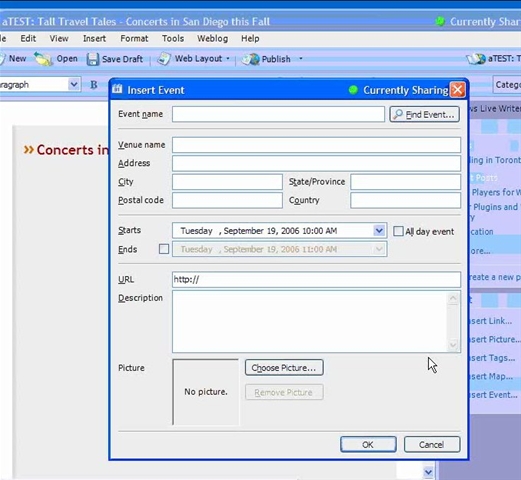
I had wondered if a third-party was going to do this due to the ease of creating plug-ins. For MS themselves to create such a tool is major news in the world of structured content creation. I can’t believe no-one else has blogged this yet!
I’m very excited by this move and if they start supporting more of the microformats, it will be a major boost to the ramp up of our business in 2007. The only big outstanding question is whether this becomes part of a standard Vista install or not, maybe in SP1?
p.s. Tag insertion (aka the rel-tag microformat) is now supported out of the box and able to target Technorati, del.icio.us, Flickr and many others.
Technorati tags: Windows Live Writer, microformats, hCalendar, Live Clipboard, Ray Ozzie, Jack Ozzie, JJ Allaire, APP, ATOM